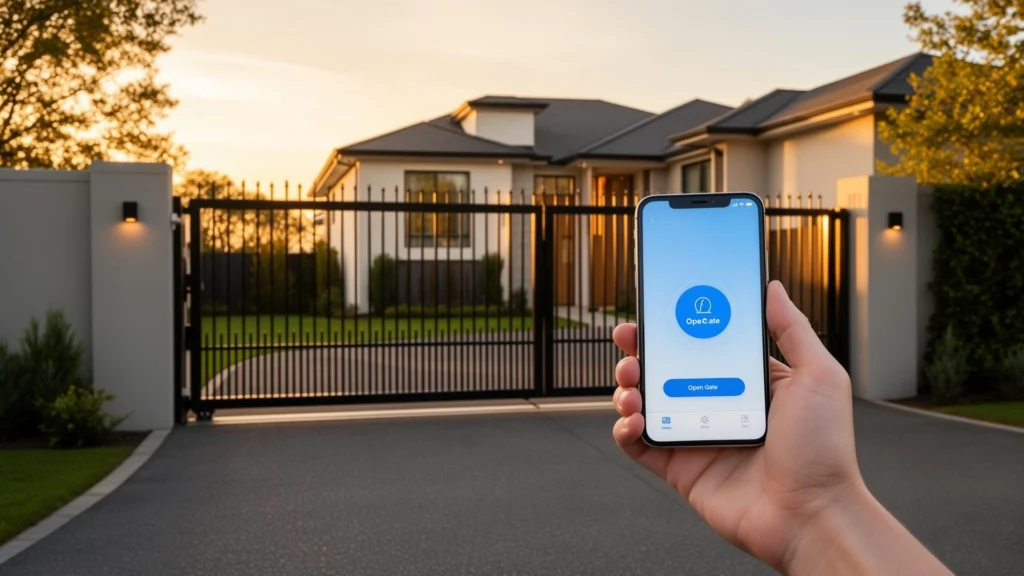
You can lock your front door, adjust your thermostat, and check your security cameras from your phone. So why are you still fumbling with a clunky remote to open your driveway gate?
The truth is, you don’t have to. Smart gate opener technology has caught up with the rest of the smart home world, and today there are multiple reliable ways to control your automatic gate, electric gate, or automated driveway gate directly from your smartphone—whether you’re pulling into the driveway, sitting at your desk at work, or letting in a delivery driver from across town.
Smart phone-based driveway gate control is one of the fastest-growing upgrades we install across our service area, from tech-forward homeowners in El Dorado Hills and Sacramento to ranch and estate properties in Auburn and Grass Valley. In this guide, we’ll break down how it works, the most popular smart gate opener options, what’s involved in setup, and how to choose the right solution for your electric gate system.
How Smart Driveway Gate Control Works
At its core, controlling your automatic gate from your phone requires a device that bridges the gap between your smartphone and your electric gate operator. Your driveway gate operator was designed to respond to simple signals—a relay closing, a dry contact triggering—and a smart gate opener module translates a command from your phone into that signal.
There are two main approaches:
Wi-Fi Gate Openers
A Wi-Fi gate opener connects to your home’s wireless network and communicates with an app on your phone through the internet. This means you can control your automated gate from anywhere you have cell service or Wi-Fi—not just from your driveway. Wi-Fi smart gate openers are the most popular option for residential driveway gates because most homes already have a Wi-Fi network in range of the gate operator.
Bluetooth Gate Controllers
Bluetooth-based smart gate openers connect directly to your phone when you’re within range (typically 30 to 50 feet). They don’t require an internet connection or Wi-Fi network, which makes them a good fit for properties where Wi-Fi doesn’t reach the electric gate operator. The tradeoff is that you can only control the driveway gate when you’re physically nearby—no remote access from across town.
Many modern smart gate opener devices offer both Wi-Fi and Bluetooth, giving you the flexibility of remote access when you’re connected and reliable local control when you’re in range of your automated gate.
💡 Pro Tip: Before choosing a smart gate opener, check whether your Wi-Fi signal reaches your driveway gate operator location. Walk out to the operator with your phone and test the signal. If it’s weak or nonexistent, you may need a Wi-Fi extender, a mesh network node, or a Bluetooth-based solution for your electric gate.
Popular Smart Gate Opener Systems
Not all smart gate openers are created equal. Here’s a closer look at four of the most widely used systems for controlling an automatic gate or driveway gate from your phone.
LiftMaster myQ
LiftMaster is one of the largest names in automatic gate and garage door operators, and their myQ smart platform is one of the most established options for phone-based driveway gate control. If your electric gate operator is already a LiftMaster model with built-in myQ connectivity, setup is as simple as downloading the myQ app and connecting the operator to your Wi-Fi network.
For older LiftMaster operators or other brands, LiftMaster offers the myQ Smart Garage Hub, which can be wired into most automated gate operators to add smart connectivity. The myQ app lets you open and close your driveway gate, monitor its status in real time, receive alerts when the gate opens or closes, and set up scheduled operations.
LiftMaster provides detailed setup resources to walk you through the process. You can find the official myQ setup guide at LiftMaster’s myQ Setup Page, and if you need help connecting your electric gate operator to your home Wi-Fi network, their detailed Wi-Fi connection guide covers the process step by step.
- Best for: Homeowners who already have a LiftMaster electric gate operator or want to stay within a well-supported ecosystem.
- Connectivity: Wi-Fi.
- Smart home integration: Works with Amazon Key, Google Home (with a subscription), and Apple HomeKit (via a bridge accessory).
Remootio
Remootio is a standalone smart gate opener module designed specifically for automatic gates and driveway gates. It’s one of the most versatile options on the market because it’s designed to work with virtually any electric gate operator brand—not just one manufacturer’s ecosystem.
The Remootio device wires into your automated gate operator’s control board and connects to your phone via both Wi-Fi and Bluetooth. The app supports multiple users, guest access with time-limited keys, event logging, and push notifications. It also offers a sensor input so you can see whether your driveway gate is currently open or closed.
- Best for: Homeowners with non-LiftMaster electric gate operators who want a brand-agnostic smart gate opener solution.
- Connectivity: Wi-Fi and Bluetooth.
- Smart home integration: Works with Amazon Alexa, Google Home, Apple HomeKit (Remootio 3), and IFTTT.
💡 Pro Tip: Remootio is a favorite among our technicians for retrofit installations on existing driveway gates because it works with almost any automatic gate operator and doesn’t require replacing the entire system.
NEXX Gate
NEXX offers a compact Wi-Fi gate opener controller that wires into your existing electric gate or automated gate operator. The NEXX app provides basic open/close control, scheduling, and the ability to share access with family members or guests. It’s a straightforward, budget-friendly option for homeowners who want phone-based driveway gate control without a lot of complexity.
NEXX also integrates with Amazon Alexa, Google Assistant, and Samsung SmartThings, so you can open your automatic gate with a voice command or include it in smart home routines.
- Best for: Budget-conscious homeowners who want simple, reliable phone control for their electric driveway gate.
- Connectivity: Wi-Fi.
- Smart home integration: Amazon Alexa, Google Assistant, Samsung SmartThings, IFTTT.
DoorKing (DKS) Connected Access
DoorKing is a major name in commercial and residential automated gate access systems, and their connected platform brings phone-based control to DKS-equipped properties. The DoorKing app allows property managers and homeowners to manage access credentials, monitor driveway gate activity, and grant or revoke access remotely—making it especially popular on multi-tenant properties, gated communities, and commercial sites across Sacramento, Elk Grove, and Marysville.
DoorKing’s system goes beyond simple open/close control. It supports telephone entry systems, video intercom integration, license plate recognition, and cloud-based access management. For properties that need to manage access for many users, DoorKing’s platform is one of the most capable options available for electric gate systems.
You can find setup resources and technical documentation on the DoorKing Smart Gate Controller support page, and for detailed phone setup instructions, DoorKing provides the full Smart Gate Switch installation manual (PDF).
- Best for: Gated communities, commercial properties, and multi-tenant residential complexes with automated gate entry systems.
- Connectivity: Wi-Fi / Cellular (depending on model).
- Smart home integration: Primarily a standalone access management platform.
What’s Involved in Setting Up a Smart Gate Opener
The installation process for adding phone control to your automatic gate depends on your current electric gate operator and the smart gate opener device you choose. Here’s a general overview of what to expect.
Step 1: Confirm Compatibility
Not every smart gate opener works with every automated gate operator. Before purchasing a device, verify that it’s compatible with your driveway gate operator’s brand, model, and control board type. Most smart gate openers work by connecting to the operator’s dry contact or relay input—the same terminals your wall-mounted button or keypad connects to. If your electric gate operator has these terminals (and most do), a smart module can typically be added.
Step 2: Check Your Wi-Fi Coverage
This is the step that trips up the most homeowners. Your automatic gate operator may be at the end of a long driveway, inside a metal housing, or behind a masonry pillar—all of which weaken Wi-Fi signals. Walk out to your driveway gate operator with your phone and check the signal strength. If it’s weak or absent, you’ll need to extend your network before installing a Wi-Fi gate opener. Properties on larger lots in areas like El Dorado Hills, Auburn, and Grass Valley frequently need a Wi-Fi extender or outdoor mesh node to reach the electric gate location.
Step 3: Wire the Smart Module
The smart gate opener device gets wired into your automated gate operator’s control board. This typically involves connecting two wires to the same relay or dry contact terminals that your existing wall button uses. On most electric gate operators, this is a simple, low-voltage connection. However, working inside a driveway gate operator housing involves electrical components—if you’re not comfortable with wiring, this is a quick job for a professional installer.
Step 4: Connect and Configure the App
Once the hardware is installed, you’ll download the smart gate opener’s app, connect the device to your Wi-Fi network (or pair via Bluetooth), and configure your preferences—user access, notifications, auto-close timers, and smart home integrations. Most apps walk you through this with step-by-step setup wizards.
Step 5: Add a Status Sensor (Recommended)
A status sensor tells the app whether your automatic gate is currently open or closed. Without it, the app can send commands but can’t confirm the driveway gate’s position. Most smart gate opener kits include a magnetic sensor or tilt sensor for this purpose. It’s a small addition that makes the entire system far more useful for monitoring your electric gate remotely.
💡 Pro Tip: If you’re adding a smart gate opener to an older automated gate system, it’s a good time to have a technician inspect the entire driveway gate—operator, safety sensors, hinges, and hardware—to make sure everything is in good condition before layering on smart connectivity.
How to Choose the Right Smart Gate Opener for Your Driveway Gate
With several strong options on the market, the right smart gate opener for your electric gate depends on a few key factors:
Your current automatic gate operator brand. If you have a LiftMaster, myQ is the most seamless choice. For all other driveway gate operator brands, Remootio and NEXX offer broad compatibility.
Wi-Fi availability at the electric gate. If Wi-Fi doesn’t reach your automated gate operator, look for a device with Bluetooth capability (like Remootio) or plan for a network extension.
Number of users. For a single household, any of these smart gate opener options will work well. For multi-tenant or commercial driveway gate systems with many users and access levels, DoorKing’s platform is purpose-built for that complexity.
Smart home ecosystem. If your home already runs on Alexa, Google Home, or Apple HomeKit, choose a smart gate opener that integrates natively with your existing platform so you can control your electric gate alongside the rest of your smart home.
Remote access needs. If you need to open your automatic gate for deliveries, guests, or service providers while you’re away from home, Wi-Fi connectivity with cloud access is essential. Bluetooth-only solutions won’t support this for your driveway gate.
Budget. NEXX is the most affordable entry point for basic phone control of an electric gate. Remootio offers the best balance of features and compatibility. LiftMaster myQ is ideal if you’re already in their ecosystem. DoorKing is a premium investment for automated gate systems that demand enterprise-level access management.
Is It Safe to Control Your Driveway Gate From Your Phone?
This is one of the first questions homeowners ask, and it’s a good one. The short answer is yes—when set up properly, controlling your automatic gate from your phone is as secure as (and often more secure than) a traditional RF remote.
Here’s why smart gate openers can actually improve your electric gate’s security:
- Encrypted communication. Reputable smart gate opener devices use AES-128 or AES-256 encryption for data transmitted between your phone and the driveway gate. This is the same encryption standard used in online banking—far more secure than the rolling codes used by most traditional automatic gate remotes.
- User-level access control. Instead of handing out physical remotes that can be lost or copied, you can grant and revoke access to your automated gate through the app. Some systems allow time-limited guest keys that expire automatically.
- Activity logging. Smart gate opener apps log every open and close event on your electric gate, so you have a complete record of who accessed your driveway gate and when.
- Real-time alerts. Get a push notification every time your automatic gate opens—so you always know when someone arrives.
The main security consideration is your Wi-Fi network itself. Make sure your home network is protected with a strong password and WPA3 (or at minimum WPA2) encryption. A compromised Wi-Fi network could theoretically allow unauthorized access to any connected device, including your smart electric gate opener.
Smart Gate Opener Quick Comparison
Here’s a side-by-side summary to help you narrow down the best smart gate opener for your driveway gate:
LiftMaster myQ: Best for LiftMaster electric gate owners. Wi-Fi. Strong ecosystem integration. Built-in option on newer automatic gate operators or add via hub.
Remootio: Best all-around smart gate opener. Wi-Fi and Bluetooth. Works with virtually any driveway gate operator brand. Excellent app with guest access and HomeKit support.
NEXX Gate: Best budget option for electric gate phone control. Wi-Fi. Simple setup. Good smart home integration for the price.
DoorKing Connected: Best for commercial and multi-user automated gate systems. Wi-Fi/Cellular. Enterprise-grade access management for driveway gate entry systems.
Ready to Control Your Driveway Gate From Your Phone?
Not sure which smart gate opener is right for your electric gate system? We’ll make it easy. Our experienced technicians will come to your property for a no-cost assessment consultation—we’ll evaluate your current automatic gate operator, check your Wi-Fi coverage at the driveway gate, and recommend the best smart gate opener solution for your setup, your budget, and how you want to use it.
Whether you want a simple upgrade to phone control or a full smart access system for your automated gate, we’ll put together a clear plan—no pressure, no obligation.
Proudly serving Sacramento, El Dorado Hills, Auburn, Elk Grove, Marysville, Grass Valley, Galt, and surrounding communities.